I’ve been running a server that mirrors posts from my rss.chat feed to my WordPress site automatically — no browser tab required. It connects to the rss.chat firehose and calls the WordPress.com API whenever I publish or edit a post. Edits flow through too.
The code is at https://github.com/scotthansonde/rsschat-wordpress-service, if you care to try it out. The requirements are similar to WordLand. You’ll need a WordPress.com account (or a self-hosted site with Jetpack), and about 15 minutes to set it up.
I took a quick look at blurt, the new WordPress short-form blogging theme available on WordPress.com.
It's a theme, just like Baseline is a theme. Themes can alter the behavior of WordPress in almost any way imaginable. It's still just a theme, so if Blurt is not using too much WordPress.com magic, it should be able to used on a self-hosted site.
The artificial 500-character limit is clunky. The compose box simply is disabled if there are too many characters. If you edit the post in the WordPress dashboard, when saved extra characters are silently dropped.
With WordLand I can post 600 characters, and they don't get cut off. If I try to edit that, the save fails. It's an early version, Blurt doesn't know how to handle posts coming from outside its UI.
I'm not sure why everyone thinks a character limit is a defining feature of social media. That should be up to the writer, not the platform. It should be a threshold, not a wall. micro.blog seems to handle this well (at 300 characters the UI show a title field you may choose to use or not).
All in all, it's a cute idea, and I look forward to see how it develops. (Sorry for the fart joke title.) (Actually I'm not sorry. 😃)
When I was creating the FeedLand Docker Compose file, I was thinking of it running on a VPS with a public hostname. There was another use case I was not thinking about: running on a local machine in a private network, without any hostname in DNS. This would be pretty common for someone just wanting to run FeedLand for themselves on their own laptop, without wanting to set up any SSL or proxy.
For this case I've added an option to run FeedLand as localhost. When the initial script is called as `./scripts/generate-env.sh –http-localhost`, the URL of FeedLand is set to http://localhost:1452, and the Caddy web proxy is not started.
I've also added a script to easily determine the confirmation URL for a new user when email has not been configured.
Thanks to John Johnston and Frank McPherson for suggesting and testing the localhost installation. This should make it even easier to explore FeedLand.
Next I intend to explore other possibilities for using the FeedLand Docker image, for example with the Synology Container Manager or with Coolify.
I have just released a Docker compose file for FeedLand for public testing. It contains a compose file some supporting scripts to quickly install an instance FeedLand together with MySQL as Docker containers. It will optionally start a Caddy proxy to enable HTTPS.
I've been testing this out on the command line of a Linux VPS. You need to have Docker installed, of course. It makes things easier if you can run Docker as a normal user instead of root.
Once you've downloaded the repo from GitHub, there are basically two steps.
- Create or generate a .env file with you FeedLand hostname and the passwords for MySQL
- Run `docker compose up -d` to create and run the containers
That's it. A config.json file is created that can be edited to add features and change settings.
Running notes will be posted to https://scott.this.how/feedlandDockerCompose.opml
This is completely inspired by Chuck Shotten's Dockerfile for FeedLand from his feedlandInstall repo. I've published a FeedLand Docker image at Docker Hub (generated by a GitHub action whenever FeedLand itself is updated).
Please feel free to try this out and let me know in the issues if the instructions are unclear or if it doesn't work as expected. 😃
It's been a while since we checked in here, so here's what's going on with the Baseline theme.
- v0.2.3 adds support for WordLand linkblogs. For posts in the 'linkblog' category, the link URL will be rendered as a link at the end of the post. A date headline appears above the posts for that day. The customizer includes an option to use the linkblog layout for the home page, for sites that consist entirely of linkblog posts. See https://links.daveverse.org for an example.
- v0.2.4 adds support for the feedland-blogroll plugin. If the plugin is installed, the home page will be rendered in two columns with the blogroll in the right column. See https://daveverse.org for an example.
- The RSS Cloud plugin for WordPress hasn't been updated in a while and wasn't working as expected. I wrote a simple RSSCloud External Ping plugin to add the cloud element to the RSS feed and ping rpc.rsscloud.io on new and updated posts. If it keeps working well I'll submit it to the wordpress.org plugin directory.
Upcoming changes will include:
- Now we create an artificial title for titleless posts. That is suboptimal when there are a lot of titleless posts. We need to offer an option to suppress the artificial titles, and perhaps show date headlines (like for linkblogs) instead.
- The now theme has so many options it is becoming unwieldy to develop. We need to break it down so the options (linkblogs, blogrolls, etc.) are plugins or separate themes in order to streamline the basic Baseline theme.
We have a proposed layout for a linkblog homepage at links.daveverse.org. It's a work in progress, and it's not yet available at the GitHub repo. The layout is very inspired by the links tab at Scripting News.
Right now the linkblog homepage is an option in the Baseline theme. When turned on, it activates a linkblog template for the homepage. Is this the right way to do it? Should a linkblog layout be a separate theme or a child theme of Baseline? I don't know yet. 😃
For the layout I* am making a lot of assumptions about linkblogs.
- The site is only a linkblog. We don't show any other kinds of posts.
- All posts are in the 'linkblog' category. Posts not in the 'linkblog' category are ignored.
- Posts will usually (or almost always) have a 'link' attribute, which WordLand puts in a custom field in the post. This will be put as a link at the end of the post.
- Posts do not have titles. If a title is included, it is ignored.
- Posts are usually (or almost always) a single paragraph. If there is more than one paragraph, they will all be printed, but the layout is optimized for one-paragraph posts.
- There are no links to individual posts.
- Archive pages of posts older than a few weeks or months is a problem to be solved later.
*I say "I" here as these assumptions are completely arbitrary and were not made in consultation with anyone else. They can certainly be discussed in the GitHub repo.
I've published a minor update v0.1.5 to the Baseline theme. It now shows a minimum number of posts on the home page, even if you haven't written any posts in the past two months.
Now that linkblogs have been added as a feature to WordLand, we're thinking about how best to display them with the Baseline theme. I've put up a prototype of a linkblog in WordPress to experiment with the layout. (The prototype gets it's data by polling the RSS feed once an hour rather than from WordLand, but the basic idea is the same.)
I'm trying out a new logic for the home page. Instead of using infinite scroll to eventually show all posts, we're showing only the posts for the current and previous month, just like Scripting News. We don't link to anything older, since old news is no longer news, and good older posts will have links from elsewhere.
There will be an option to show the traditional WordPress pagination links to older posts for those who prefer that behavior.
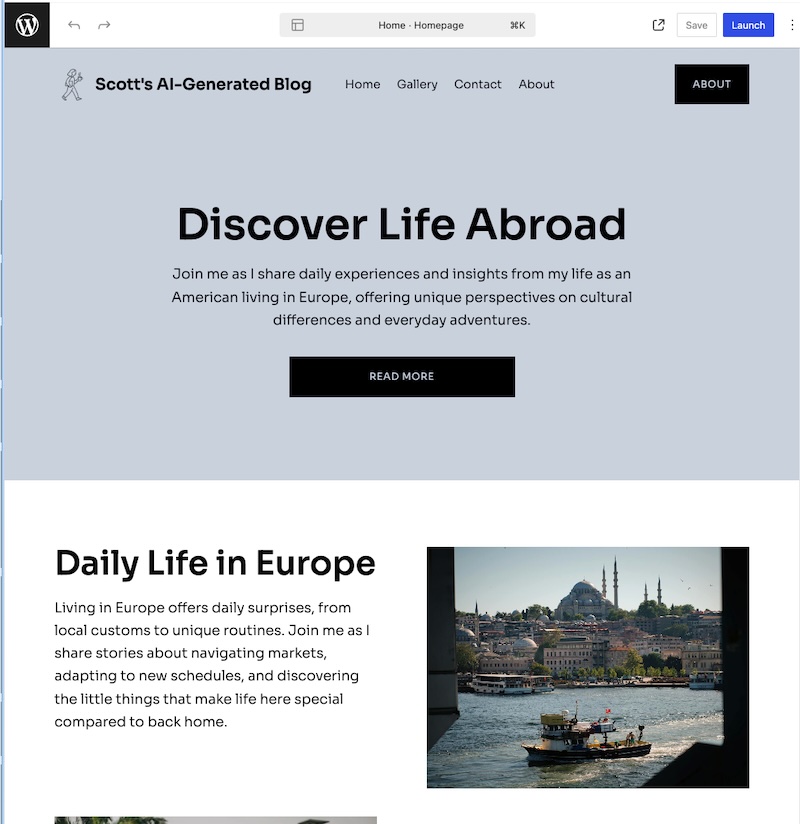
I got a mail from WordPress today announcing their AI website building. Having just built a (very basic) theme for WordPress, I decided to take it for a spin.
The first blurb on the entry page is "This is way better than Wix." So we see who their target audience is.
I told the prompt that I wanted a blog to feature my own writing, ranging from tweet-like short posts to a few paragraphs, on daily life and current events from an American living in Europe. It crashed once, but it sent me a mail with a link to resume working on the site.
After it was done with my prompts, it put me in the WordPress Site Editor and asked me to choose fonts, colors, and a basic layout. It won't let me out of the Site Editor until I upgrade to a paid site.
The text is soulless AI, really hung up on Europe. But it looks like a working theme that I could start out with if I were looking to make a site like this. I would give it the Midwestern compliment "it's not too bad".
We've just packaged v0.1.2 of the Baseline theme, which adds support for featured images (here's an example). The installation instructions are here.
Our next goal is to get the theme accepted into the WordPress.org theme directory. That will make it a lot easier to install on self-hosted sites, and and is a prerequisite to getting the theme approved for WordPress.com.
While not strictly necessary for acceptance, in that process we'll be converting Baseline to a block theme. We want to be certain Baseline is compatible with future versions of WordPress, and a block theme will help ensure that.